이 문서는 영어로만 제공됩니다. 영어판이 공식 문서이며 우선하여 적용되고, 번역본은 제공되지 않습니다.
SMS Opt-In Disclosure & Consent Flow
Last updated: October 7, 2026
About this page
This page documents the SMS opt-in consent flow used by Pinion, operated by Gamer Alliance Members Esports, LLC. It is provided as publicly accessible reference material for The Campaign Registry (TCR), Twilio, mobile carriers, and other reviewers verifying our A2P 10DLC campaign registration. The page mirrors the consent experience presented to end users on the sign-up screen of the Pinion mobile app and the sign-in page of the Pinion website.
Brand & Sender
Brand: Pinion (operated by Gamer Alliance Members Esports, LLC).
Website: https://pinionup.com
Mobile app: Available on the Apple App Store and Google Play Store (search “Pinion”).
Support email: contact@pinionup.com
Mailing address: 187 E Warm Springs Road, Suite B, Las Vegas, NV 89119, USA
Messaging program: Pinion sends SMS messages on its own behalf as the registered brand. Pinion is not an ISV reselling messaging to third-party customers.
Who receives messages and why
Pinion is a recruiting and scholarship-matching platform for student-athletes. Recipients of Pinion SMS messages are student-athletes (and, where applicable, their parents or guardians) who have created a Pinion account through the Pinion mobile app or website and explicitly opted in to receive SMS messages. A user under 18 also needs a parent or guardian to have approved their account. Messages include:
- Scholarship and recruiting match alerts based on the athlete’s sport, position, graduation year, and profile.
- Tournament and event registration announcements.
- Weekly engagement and activity reports summarizing profile views and recruiter interest.
- Product and platform updates relevant to the athlete’s recruiting journey.
Message frequency varies. Message and data rates may apply. Consent is not a condition of creating a Pinion account or using the service.
How users opt in
Users create their Pinion account through the Pinion mobile app (iOS and Android) or the Pinion website at pinionup.com. The opt-in flow is the same on both:
- The user downloads the Pinion app from the Apple App Store or Google Play Store, or opens pinionup.com.
- The user enters their mobile phone number and confirms it with a one-time verification code, sent by SMS (or WhatsApp, if they choose that channel).
- On the account details step of registration, where the user agrees to the Terms and Conditions and Privacy Policy, they see an unchecked-by-default checkbox, below the Terms checkbox, next to the following disclosure text:
“I agree to receive text messages from Pinion about my account, scholarship matches, and events. Message frequency varies; message and data rates may apply. Reply HELP for help or STOP to unsubscribe. Consent is not a condition of use. See our Privacy Policy, Terms & Conditions, and SMS Terms.”
The full list of message types this covers is in Who receives messages and why above; the disclosure itself is kept short so it is actually read, while every element carriers require at the point of consent stays inline next to the checkbox.
- The checkbox is optional. The user can register without checking it and still use Pinion, because consent is not a condition of use. It is asked only this once, at registration. Pinion sends program messages only to users who opted in.
- When the user completes registration with the box checked, Pinion records the consent event as described in Consent record keeping below.
- Afterwards, the user can turn text messages on or off at any time with the “Text message updates” switch in Notification settings, which shows the same disclosure and is recorded the same way, or by replying STOP or START to any of our messages.
- If the user is under 18, Pinion records their choice the same way but sends no program messages until a parent or guardian has approved their account, and stops if that approval is withdrawn. The parent or guardian is told this when they are asked to approve.
Screenshots of the opt-in flow
The following screenshots show the consent experience exactly as presented to end users in the Pinion mobile app. All screenshots are publicly accessible on this page and require no login.
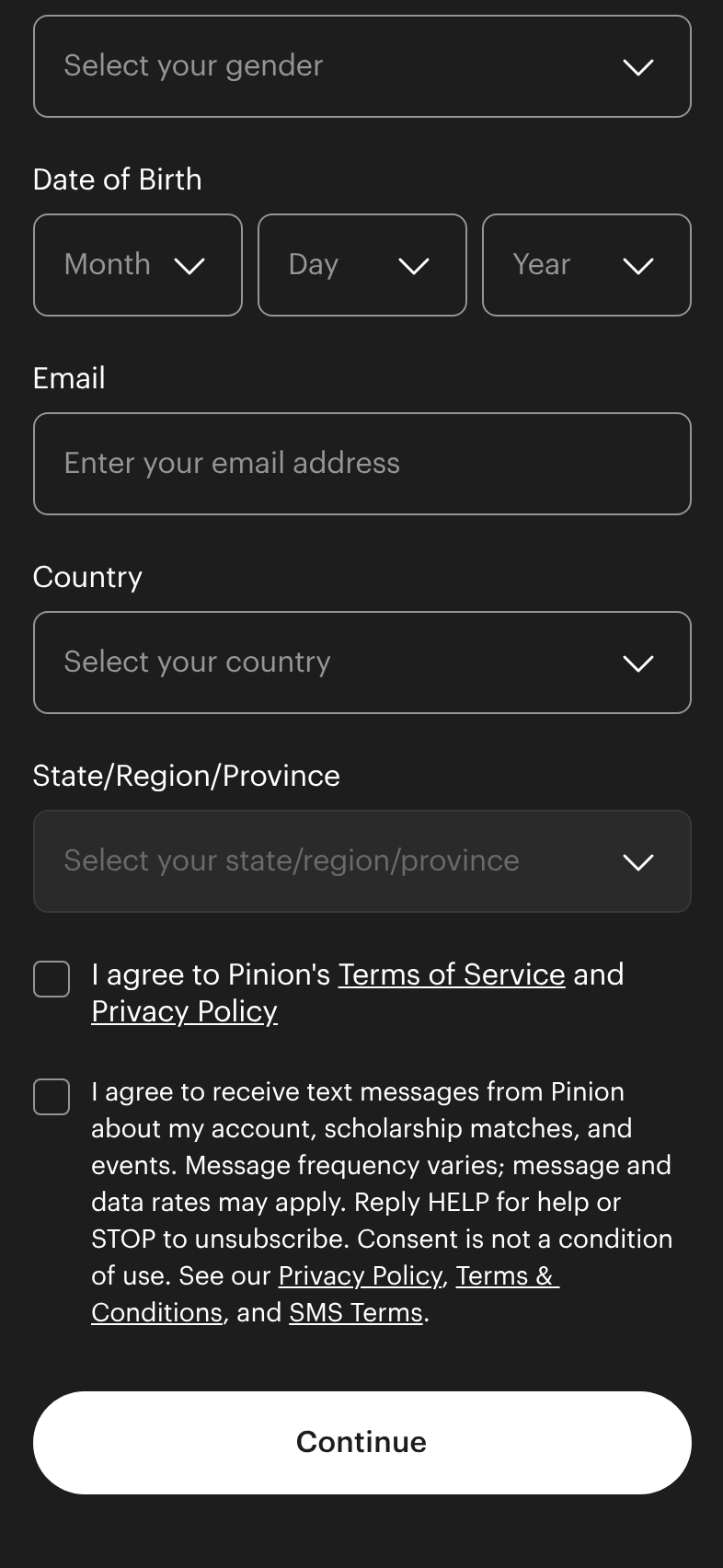
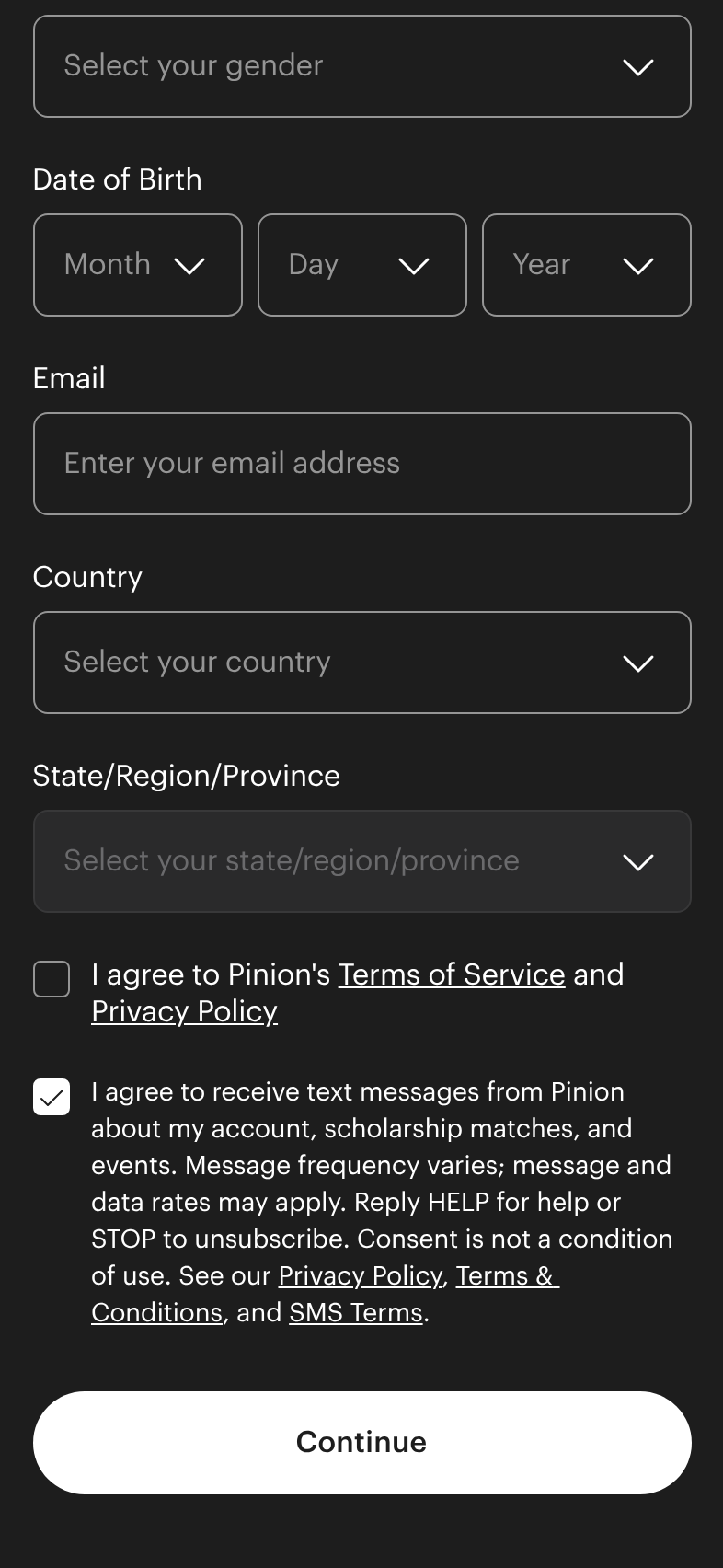
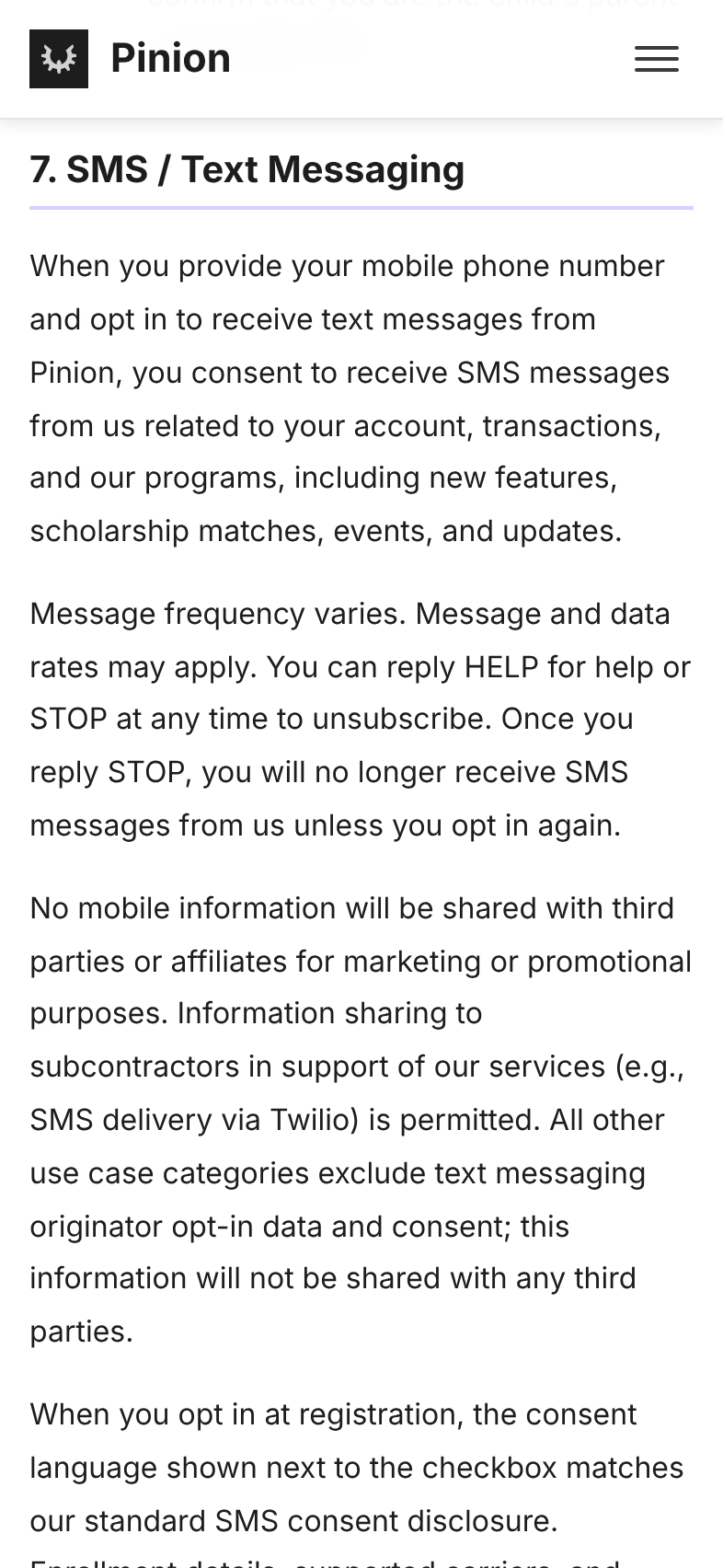
Required disclosures presented at opt-in
The opt-in screens in the app and on the website display the following disclosures, either inline next to the consent checkbox or via the linked legal pages:
- Identity of the sender: Pinion.
- Description of the messages: scholarship match alerts, tournament announcements, engagement reports, and platform updates.
- Message frequency: Message frequency varies.
- Rates: Message and data rates may apply.
- Opt-out instructions: Reply STOP to unsubscribe.
- Help instructions: Reply HELP for help.
- Link to Privacy Policy.
- Link to Terms of Service.
- Statement that consent is not a condition of using the service.
Confirmation message
Upon successful opt-in, the user receives the following confirmation SMS from Pinion:
“Pinion: You’re now subscribed to Pinion SMS alerts. Msg frequency varies. Msg & data rates may apply. Reply HELP for help, STOP to opt out.”
HELP and STOP behavior
Users can reply HELP at any time to receive support information. Users can reply STOP at any time to opt out of all marketing SMS from Pinion.
HELP auto-reply: “Pinion: For help, contact support at contact@pinionup.com. Reply STOP to opt out. Msg & data rates may apply.”
STOP auto-reply: “You have successfully been unsubscribed. You will not receive any more messages from this number. Reply START to resubscribe.”
Additional opt-out keywords recognized: OPTOUT, CANCEL, END, QUIT, UNSUBSCRIBE, REVOKE, STOP, STOPALL. Additional help keywords recognized: HELP, INFO.
Sample messages
The following are representative messages sent under this campaign:
- “Pinion: Registration for the spring showcase is now open. Details at pinionup.com/news. Reply STOP to opt out.”
- “Pinion: Your weekly report is ready: 12 profile views and 3 recruiter visits this week. See it at app.pinionup.com/profile. Reply STOP to opt out.”
- “Pinion: New schools matching your profile are now on Pinion. Browse them at app.pinionup.com/discover/schools. Reply STOP to opt out.”
- “Pinion: 8 new schools matching your sport, position, and class year were just added. View matches at app.pinionup.com/discover/schools. Msg & data rates may apply. Reply HELP for help, STOP to opt out.”
- “Pinion: You’re now subscribed to Pinion SMS alerts. Msg frequency varies. Msg & data rates may apply. Reply HELP for help, STOP to opt out.”
Consent record keeping
For every opt-in event, Pinion records the user’s mobile phone number, the date and time of opt-in, the IP address from which the opt-in was submitted, the platform (iOS, Android or web) and app version that captured it, and the exact consent disclosure text shown to the user, in the language shown. Records of STOP and HELP requests are also retained. These records are maintained in accordance with CTIA Short Code Monitoring Handbook guidance and TCPA requirements.
Mobile phone numbers and SMS consent data collected by Pinion are not shared with third parties or affiliates for marketing or promotional purposes. See the SMS / Text Messaging section of our Privacy Policy for full details.
Reviewer contact
For questions about this opt-in flow or to request additional evidence (such as a screen recording of the registration flow or a sandbox test account), please contact contact@pinionup.com.